Setup Project Data
 Admin User
Core project data such as results, codes, calendar structures, rate structures, and resource structures must be defined before you can create a new project (see Manage Projects). Selected core data including the list of named results and other advanced functions such as resource roles and parts are shared with all projects. Code, calendar, rate, and resource structures are project unique. You also have the option of setting up global calendar, rate, and resource structures projects can share (see Setup Global Structures).
The basic steps to create a new project are illustrated and described below.
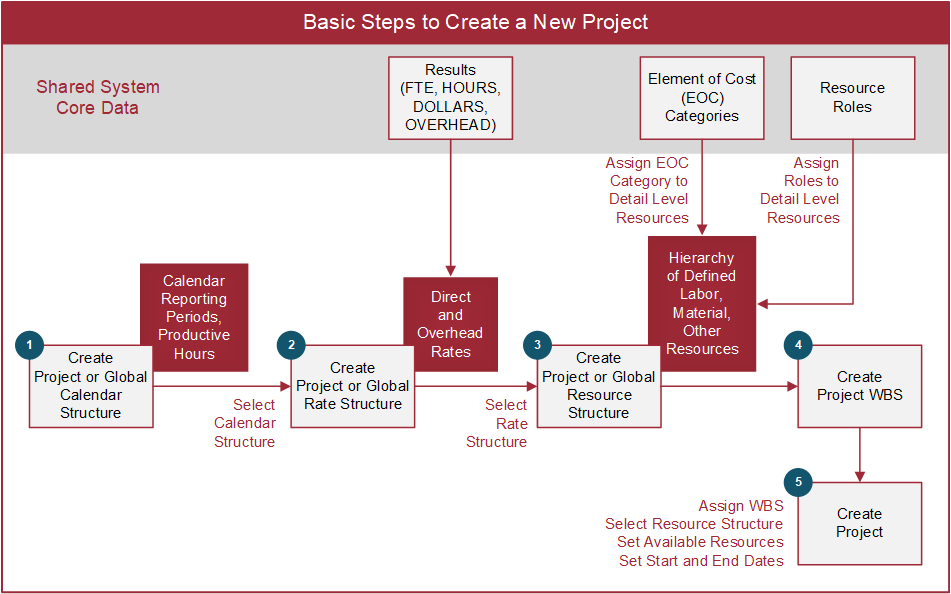
 Establish Shared System Core Data
You only need to set up the core data once when the ProjStream software is first installed.
- Define named Results. Examples of named results include FTE, HOURS, DOLLARS, or OVERHEAD. The named results may be combination of common results all projects use and project unique results.
- If needed, edit the set of predefined set of summary element of cost (EOC) categories (labor, material, other direct costs, and subcontract) otherwise use the predefined set as is. See Manage Element of Cost.
- Recommended. Define and maintain a common list of Resource Roles all projects share. These resource roles are used for the Enterprise Nodal Structure (ENS) cross-project resource capacity and demand analysis.
Basic Steps to Create a New Project
- Create a project unique or global Calendar Structure.
- Create a project unique or global Rate Structure.
- Create a project unique or global Resource Structure. Assign a summary element of cost category and resource role as applicable when you define the lowest level resources. Resources are assigned a single resource role. One or more resources can be assigned to a single resource role.
- Create project unique or global Codes. At a minimum, this includes the work breakdown structure (WBS). You can enter or import the WBS for the project. See Create a Code Structure or Import a Code Structure. If you intend to add user defined codes or fields to your resource structure, add those codes before you create your resource structure.
- Create the project.
Note:
As a administrative user, you may also need to create additional distribution profile spread curves using the Admin Navigation Menu options.